
Electrify America
Electrify America LLCMaps & Navigation
4.62.82K Reviews
- Version
- 7.35.0
- Installs
- 500.00K
- Age Rating
- Everyone
Screenshots
Our Review of Electrify America
 Analysis by Appyee
Finding a public fast charger is only part of the electric-car experience. I also want to know what I am agreeing to when I install the network’s app, whether I can control my account without unnecessary friction, and how much of the charging process depends on sharing location or payment information. Electrify America approaches that job as a dedicated Maps & Navigation app from Electrify America LLC, with a clear focus on locating and using its own charging network.
After spending time with it, I see it as a practical companion for drivers who regularly use Electrify America stations, rather than a universal replacement for every charging tool. It is free, rated for Everyone, and has built a sizable audience, with a 4.6 average from around 22 thousand ratings and more than 500 thousand installs. That level of adoption makes it easier to take seriously, but popularity alone is not a reason to hand over personal information without thinking about the choices presented during setup and use.
What the app is really useful for on the road
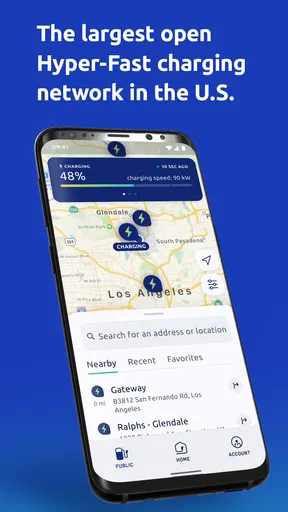
The central value is straightforward: I can use one place to look for Electrify America fast-charging locations and plan a stop around the network I expect to use. This is especially helpful when I am traveling outside my usual area and do not want to rely on memory, roadside signs, or a general map that may not give charging-specific context in the same way.
That focus is also the first important trade-off. If most of my charging happens at home, or if I move between several unrelated networks, this app is unlikely to be the only one I need. A general mapping service can be more convenient for an entire journey, while a vehicle manufacturer’s app may be better for car-specific route planning, battery estimates, or vehicle settings. Electrify America is strongest when the question is, “Where is the relevant station in this network, and how do I manage that stop?”
The app’s store summary describes a public fast-charging network with over 500 charging stations. I would treat that as a reason to check coverage along a planned route, not as a promise that every trip will be effortless. Station availability can change while driving, and a charger that is geographically close may still be inconvenient because of traffic, access roads, opening arrangements, or the needs of my particular vehicle.
A realistic everyday use case is a weekend drive in an unfamiliar region. Before leaving, I can inspect the network’s locations and decide where a charging break might fit naturally into the journey. On the road, I would still keep a backup plan rather than waiting until the battery is nearly empty. That habit matters more than any single map screen: the app can help me identify an option, but it does not remove the need for sensible range planning.
Why a network-specific app can beat a general map
General map apps are excellent for finding destinations, comparing routes, and checking nearby businesses. They are not always the best place to manage a charging stop tied to one operator. A dedicated network app keeps the search centered on Electrify America locations instead of making me filter through unrelated fuel stations, private chargers, or incompatible equipment.
That narrower scope can reduce mental clutter during a trip. I am not searching for every possible charging provider; I am checking the network I have chosen. For a driver who already knows that Electrify America is the preferred option, this is a meaningful advantage.
The reverse is equally important. If I need to compare operators, check a destination charger, or build a route around several networks, the dedicated focus becomes a limitation. I would use a broader tool for the first stage of trip planning and keep this app for network-specific verification and account-related actions. Using both is more realistic than expecting one application to solve every charging question.
What I would check before depending on a station
I would not make the app my only source of confidence immediately before a long trip. Instead, I would use it earlier in the planning process, confirm that the station is near a sensible stopping point, and leave enough battery margin to reach another option if circumstances change. This is one of the less obvious but most useful workflows: use the app to narrow the choices, then make the final decision with geography, time, and vehicle range in mind.
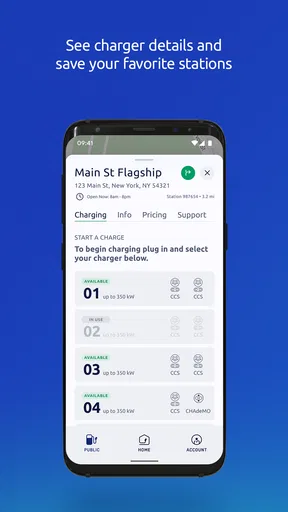
I would also avoid treating a map pin as proof that the stop will suit every car. Connector compatibility, charging speed, parking layout, and access can matter just as much as distance. The app is valuable for locating the network, but I still need to understand my vehicle and the route around it.
Trust, account controls, and the moments that deserve attention
For a charging app, trust is not an abstract issue. The service may sit beside a live trip, a payment step, and a location search, so I pay attention to what I am asked to do at each stage. I prefer to create or use an account only when it gives me a clear benefit, and I want the app’s screens to make the next action understandable rather than pushing me through a vague setup process.
Electrify America is free to install, which lowers the barrier to trying it before a journey. Free does not mean that every interaction is consequence-free, though. Charging itself can involve a separate transaction, and I would read the confirmation screen carefully before starting a session. I would check the selected station, the vehicle connection, and the payment or account choice instead of tapping through automatically.
The app was released on May 22, 2019, and its current version is 7.35.0. Those details tell me that this is an established product rather than a newly launched experiment, while the version number also reminds me to keep it updated through the normal app-store process. I would not assume that an older installation behaves exactly like the current release, especially when an app is used during a time-sensitive trip.
Permissions should match the task
My rule with any navigation app is simple: I allow access that clearly supports the action I am taking, and I revisit permissions when I no longer need them. For this app, location access can make sense when I am searching around my current position or trying to orient myself near a station. I would be more cautious about granting broad or continuous access if I only want to browse locations before leaving home.
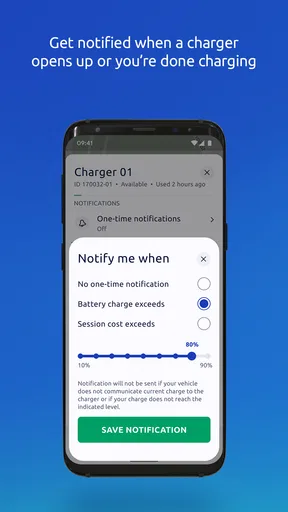
That is not a claim about a particular permission screen or a hidden data practice. It is a practical way to preserve control: read the wording shown by the operating system, choose the narrowest option that works, and change it later if the app remains useful without that access. The same principle applies to notifications. A charging reminder may be helpful during a session, but I do not want every optional alert enabled by default if I rarely need it.
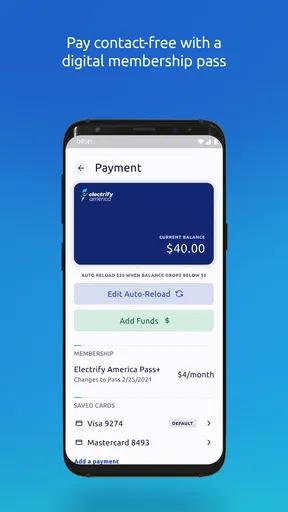
Payment information deserves the most deliberate attention. I would add it only when I am ready to use the network, verify that I am working in the correct account, and avoid entering financial details while distracted at the roadside. If I lend my phone to someone else to help with a charging stop, I would prefer to supervise the confirmation step rather than leaving an unlocked account open.
Account choices can affect convenience
A dedicated network account may make repeated charging more convenient, but convenience can also encourage me to leave an account signed in indefinitely. On my own device that may be acceptable, provided the phone is protected with a screen lock. On a shared device, a borrowed phone, or a phone that may be handed to a parking attendant, I would sign out or avoid storing information unnecessarily.
I would also keep my profile details limited to what the service actually needs for the task. A charging app does not need to become a general diary of every journey I take. When an account screen offers optional fields or communication choices, I would pause and decide whether they improve my experience or simply create another channel to manage.
Data-sensitive moments during a normal trip
The most sensitive moments are easy to identify. The first is searching near my current location. The second is choosing a station while traveling. The third is beginning a charging session, where account and payment decisions may meet a physical vehicle connection. The fourth is using the app after the car is parked, when I may be tempted to leave the session screen open and the phone unattended.
I would handle these moments differently. At home, I can browse with time to review settings and station details. On the road, I would pull over before interacting with the app rather than using it while driving. At the charger, I would verify the station and session details before confirming, then lock the phone when I am finished. These are small habits, but they reduce the chance of selecting the wrong location or exposing an active account.
Location history is another reason to be thoughtful. Even when a map app is useful, I do not need to treat every search as a permanent travel record from my own perspective. I would examine the privacy and account controls available on my device and inside the app, use the operating system’s permission manager, and remove access when it no longer serves a purpose. I would not infer that a particular retention policy exists without reading the current privacy materials myself.
Where the experience may feel less comfortable
The biggest friction is the tension between speed and careful checking. A driver wants to find a charger quickly, but account creation, permissions, payment setup, and station verification all take attention. That is manageable before a trip; it is much less pleasant when the battery is low and the next stop is urgent.
This is why I recommend installing and testing the app before the first long journey. I would open it on a normal day, explore the station search, review account controls, and decide whether I want location access enabled. If payment setup is necessary for the way I intend to charge, I would handle it while stationary and connected to a trusted network. Doing this early turns a rushed roadside decision into a calm preparation step.
Another limitation is that a network-specific view may not answer every question about the wider charging landscape. If the nearest Electrify America location is unsuitable, I may need another map or charging service to compare alternatives. That is not a failure of its core purpose, but it does mean I should not confuse “useful for this network” with “complete electric-car navigation.”
Who should use it, and who should skip it
I would recommend it to an EV driver who expects to use Electrify America regularly, travels through areas covered by the network, or wants a direct way to check its charging locations. It is also sensible for someone preparing for a road trip who wants to understand the network before departure instead of discovering the app at the first urgent stop.
I would be less enthusiastic for a driver who charges almost exclusively at home, rarely visits public fast chargers, or wants one application to compare every provider. In those cases, the extra account and permission decisions may not justify installing a network-specific tool. A vehicle’s built-in navigation or a broader charging planner could be a better first choice, with this app added only when Electrify America becomes relevant.
Parents and shared-device users should pay attention to account separation. The Everyone age rating makes the app broadly accessible, but that does not mean every account should remain open on every phone. I would use a personal device protected by a passcode, avoid sharing saved payment access casually, and check who can see notifications on the lock screen.
My practical setup before a long drive
I install the app while I have reliable internet and enough time to explore it without being rushed.
I search for likely charging stops before departure and compare them with my actual route, not just a straight-line map position.
I review location, notification, and account settings, allowing only what helps with the trip I am planning.
I make sure I understand the confirmation steps before connecting the car, especially if payment or a saved account is involved.
I keep a second route option in mind and avoid arriving at the first charger with no practical battery margin.
The most useful tip in that routine is the third step. Permission choices are easier to judge when I am sitting at home than when I am standing beside a charger in poor weather. The second is equally important: a station can look perfect on a map but still be awkward if it forces a detour or does not fit the timing of the trip.
My cautious verdict
Electrify America earns its place on my phone when I plan to use Electrify America stations, because its network-specific purpose is clearer than trying to force a general map to handle every charging detail. I like the directness of having a dedicated tool for locating the network, and the free download makes it easy to prepare in advance. The developer is Electrify America LLC, and the app’s mature presence on Android, including support from OS 8.0 onward, makes it accessible to many existing devices.
My recommendation comes with boundaries. I would not depend on it as my sole trip planner, I would not interact with it while driving, and I would not rush through permission or payment prompts simply because the battery is getting low. Its best role is one part of a careful workflow: plan with a broad view, verify Electrify America locations in the dedicated app, protect the account, and leave room for a backup.
For me, the deciding question is not whether it replaces every alternative. It does not. The better question is whether I expect to use this particular charging network and value a focused way to find and manage its stations. If the answer is yes, I think the app is worth trying. If the answer is no, a broader navigation or multi-network charging solution may be the more sensible starting point.
Overall, I see it as a useful, specialized app rather than an all-purpose electric-car command center. Its strongest quality is focus; its main weakness is that focus can leave gaps when a journey involves other networks or more advanced vehicle planning. Used with sensible privacy choices and a little preparation, it can make public fast-charging stops easier without asking me to surrender control of every part of the trip.
Verdict
Strengths of Electrify America
- Large fast-charging network across the United States
- Supports multiple EV brands and charging standards
- Station locations and availability are easy to check in the app
- Offers contactless payment and account-free charging options
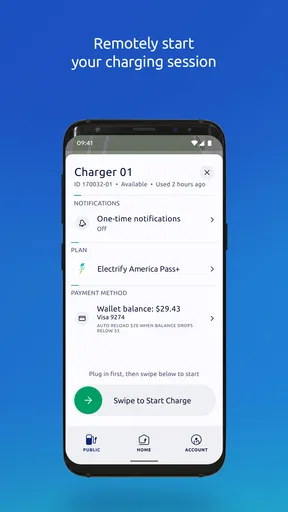
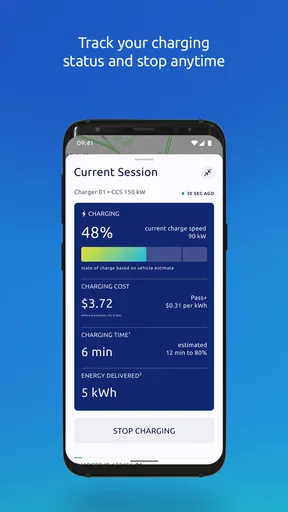
- Charging sessions can be monitored remotely from the phone
Limitations of Electrify America
- Some stations may be busy or unavailable when you arrive
- Charging speeds can vary depending on the vehicle and battery level
- Pricing differs by location and may be difficult to estimate beforehand
- The app may occasionally show outdated station availability
- Reliable service depends on local network coverage and station condition
Similar Picks in This Category
View All
Uber - Request a ride
Uber Technologies, Inc.4.7


inDrive. Rides with fair fares
® SUOL INNOVATIONS LTD4.8

Yandex Go: Taxi Food Delivery
Mikromobilnost LLC Belgrade4.8

Bolt: Request a Ride
Bolt Technology4.8

Rapido: Bike-Taxi, Auto & Cabs
Rapido Bike Taxi4.8
Frequently Asked Questions
What is Electrify America, and what can I use the app for?
Electrify America is an electric vehicle charging network and mobile app designed to help drivers find, use, and pay for public DC fast chargers and Level 2 stations. After installing the app, you can browse nearby locations, check charger availability, view pricing, start or stop a charging session, monitor charging progress, and save payment details. It is especially useful for planning longer EV trips.
Does the Electrify America app work with every electric vehicle?
The app supports many battery-electric vehicles and plug-in vehicles that use compatible charging standards, but charger compatibility depends on your car’s connector, charging capability, and location. Most stations support CCS connectors, while some locations also offer CHAdeMO or NACS options. Before beginning a trip, check your vehicle manual and the station details in the app to confirm that the connector and power level are suitable.
How much does charging cost through Electrify America?
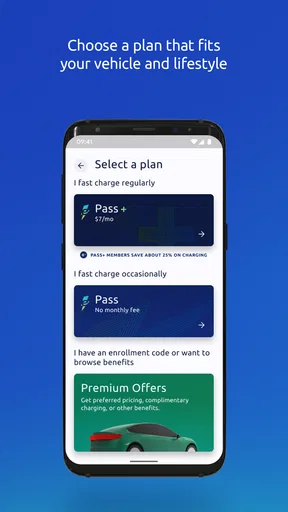
Charging prices vary according to the station, charging speed, local regulations, time-based pricing, and whether you have a membership plan. The app normally displays applicable rates before you start a session, although taxes or additional fees may apply. Some stations may use a session fee or idle fee, so it is important to review the pricing information and unplug your vehicle promptly when charging is complete.
Can I use Electrify America without creating an account?
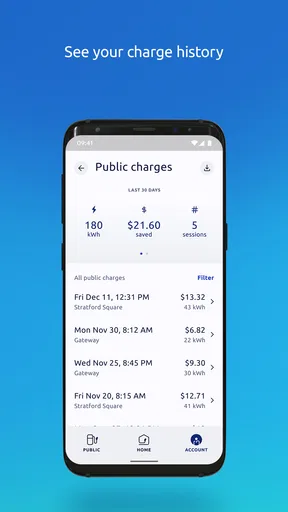
In many cases, you can start a charging session as a guest by using a compatible payment method at the charger, although the exact options may differ by station. Creating an Electrify America account is generally more convenient because it lets you save payment information, review charging history, manage membership benefits, receive session updates, and start charging from the app. Account features can also make repeated road trips easier to manage.
What should I do if an Electrify America charger is unavailable or stops working?
If a charger is occupied, offline, or experiencing an error, use the app to check nearby stations and review real-time status information when available. You can also try another connector at the same location or contact Electrify America customer support through the app or the support number shown on the charger. Keep in mind that station status may change quickly, so checking again shortly before arrival is recommended.
